
If you are wondering what we are talking about, click here to read the back story. Then come here and do it the easier way
So I took my own advice and tried to find a way to send mail from the command line. This way the mail.app doesn’t keep flicking to the forefront every few hundred seconds. That was getting old quickly. It turns out it wasn’t very difficult. From what I have read, different people may have a different experience due to their isp’s policies on sending mail and how google reacts, but I digress…
This one is simple!
It is two terminal scripts, a text file, and a loop in automator. DONE!
For starters fire up textedit and make a plaintext document. Name it “emailcontent.txt” and save it somewhere. If you want your email to have content, then type some in here.
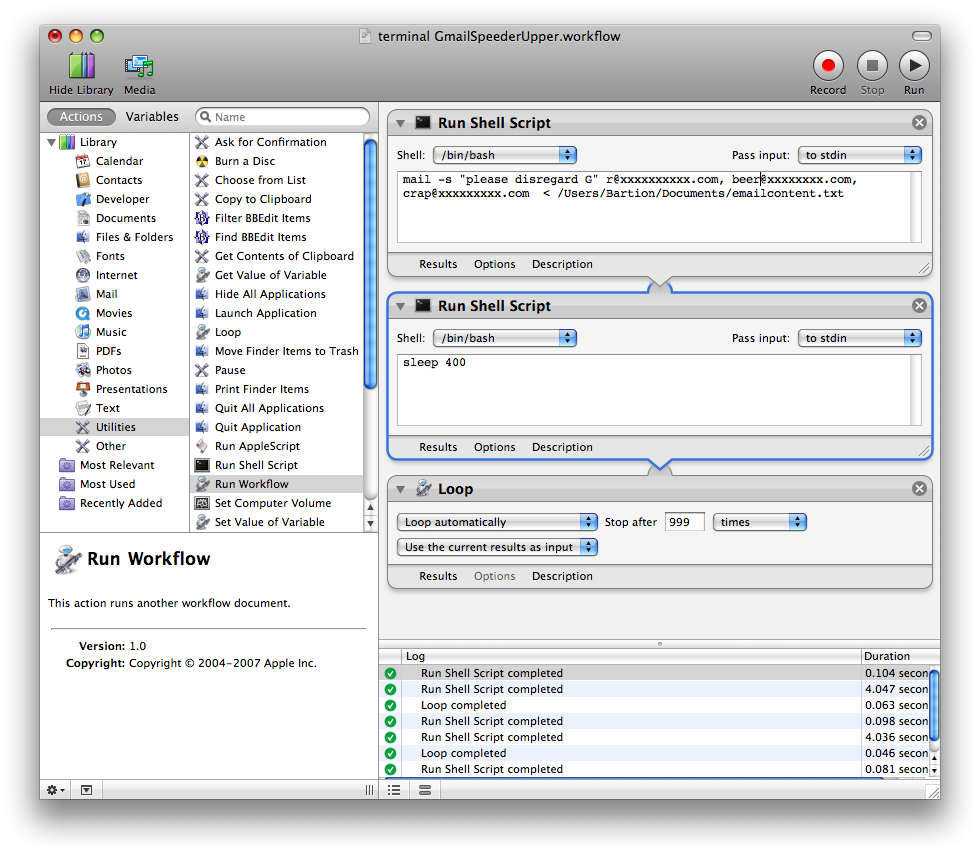
Open up automator, go to utilities, drag the “run shell script” icon off to the right side of the screen, and paste in this code.
mail -s "email subject HERE" r@xxxxxxxxxx.com, beer@xxxxxxxx.com, crap@xxxxxxxxx.com < /Users/Path/To/Your/emailcontent.txt

In the code above change the emails to ones you want to send mail to, change the subject to the one you are filtering for, and change the path to where you saved your text file. If you want to find an easy way to get the path, simply drag the file into the terminal window.
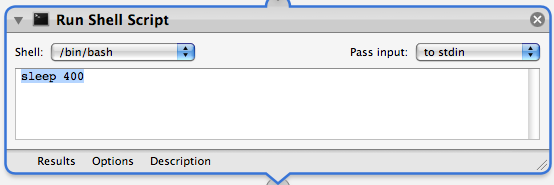
Now drag in a new "run shell script" item from automator and paste in this code.
sleep 400
The number above is the interval at which it will send emails in seconds. Adjust to your needs.
Next drag over the "Loop" item and set it to "loop automatically" and stop after "999" times.
Save the workflow, and test it. It should loop and send emails. You might want to reduce the interval for testing purposes, but set them back once you are happy with it.

Finally, export it ("save as") as a .app and you are good to go. Double click it and you are off to the races!
I assume you are using gmail to check your POP account in order to take advantage of IMAP on gmail.
Wouldn’t it be much more efficient simply to set-up mail forwarding on your old POP account’s server — and forward all incoming messages to gmail?
Mine works this way, and instead of waiting for gmail to check my POP account whenever the Google algorithm determines it is time — and as opposed to sending an onslaught of email messages to my gmail account to manually adjust the algorithm, I simply look at it from the other side. Have your POP account forward all incoming messages to your gmail account.
This happens instantly when an email message arrives in your POP account. A second later, gmail behaves as you would expect any IMAP system to work… it sends the message on to your mail client instantaneously.
Essentially, you are using gmail as a go-between — enabling an old POP account to function as IMAP. But with only a minor change (via POP mail forwarding), the message flows from sender to your POP account to gmail to your mail client smoothly — and without the (up to) 58 minute delay gmail’s algorithm can impose. Also, bandwidth is only utilized when a message comes your way (as opposed to sending-deleting, sending-deleting etc. to trigger gmail to check for any new mail).
This seems like the most logical arrangement to me.
I agree that method does have its benefits, but if you get a lot of email then it can be tedious to have to open up each mail (because they are all from you) to see who sent it to you. Is there any way to forward while still being able to quickly identify the original sender?
There is no doubt that this is a hack, and not even a fully featured on at that, but it does serve a need.
I guess a better question might be: since I own all of the domains I am receiving email at, why don’t I just set it up as imap? I don’t have an answer for that. perhaps I should.
Thanks for your thoughts!
This is a great trick. I have a company who points its MX records at an Exchange server but I can’t give up my gmail filtering and slickness, so I have a Google Apps account for our company domain, and do POP reads from actual to gmail. I can’t do forwards. My question is, after you’ve “trained” google, does it ever revert back to the slower pace? How long does the improvement last?
Interesting… I never considered using a 3rd party app outside of your browser to check POP3 accounts in Gmail. If you’re looking for an in-browser solution for Firefox (on Windows or Mac) I wrote this Greasemonkey script that is pretty amazing:
http://www.danielslaughter.com/projects/gmail-pop3-checker-for-greasemonkey/
EyePulp: sadly, it looks like Gmail may have wised up to my plan! After a few weeks of running this google defaulted to checking my mail once or twice an hour. just like it regularly does. I’m not sure if they figured it out, or if they just changed their rules for how that scheduling is figured out. I’ll find another way. have no fear…
Gmail is so cool my whole family should have it
@TinyEnormous
Forwarding from google aps provate domain account to gmail account doesn’t work like you described, I don’t have the problem with emails being “from me”, they appear with original sender address after being forwarded and once I found it I switched from pulling them with POP to straightforward (!) forwarding. Wouldn’t get the idea without your post and Dan’s here reply to it thou, so Thank You.
I created the workflow on os x lion 10.7.3, but there is no mail being sent out of os x mail.
mail -s “Testing” myrealemailaccount@gmail.com < /Users/grantdoug/Desktop/emailcontent.txt
I simply want to beat the one minute check retrieve setting, so that I can complete a POP archiving of my gmail messages over the years. POP to Gmail is retrieving in sets average 7 each minute, which will take at least a week of continuous retrieval!
Maybe I should see how far back in time I can go with IMAP, and shut off POP retrieval at that time point, and in OS X mail, move the IMAP and POP sets into a single archive folder.
Thank you!
i got the google POP / SMTP mail -s command working in LION with this fix: http://www.anujgakhar.com/2011/12/09/using-macosx-lion-command-line-mail-with-gmail-as-smtp/comment-page-1/#comment-22122
however, when running in the background it does not update OS / X pop mail any more frequently.. still stuck at once / minute.
An update – I was able to implement this with all the excellent help I received here and references from LifeHacker. I tried to get it down to once every two minutes, but gmail complained that I was checking too frequently and would occasionally report an authentication error. Right after that auth error, I used the Gmail Lab POP checker which reported the “POP mail checked too soon” error. Has anyone else experienced this?
Hello, I just tried the instructions above and it doesn’t work! What am I missing???? Please help!
Dan’s solution is genious.
On my Cpanel set forwarding to my gmail account. Easy and instant.
Hi, my shell script is constantly at 2/3 in the menubar, is this normal?